For video podcasters, “good enough” internet is no longer enough. A single frozen frame,_audio dropout, or buffering bar can scare away viewers, hurt your brand, and limit your growth. The right internet speed gives you smooth live streams, crisp uploads, and reliable remote interviews—so you can focus on content, not connectivity.
Why upload speed matters more than download
Most users focus on download speed, but for video podcasters, upload is the real bottleneck. Upload speed determines how cleanly your camera feed, microphone, and screen‑share travel to platforms like YouTube Live, Zoom, or Riverside. Generic podcast guides often recommend at least 5 Mbps upload for high‑quality audio with one guest; for live video podcasts or multi‑guest sessions, 10 Mbps or higher is much safer.
For 1080p live streaming, many streaming‑speed charts show 10–15 Mbps upload as ideal, while 4K video requires 25 Mbps or more on both upload and download. If your upload is too low, you get dropped frames, pixelation, or auto‑downscaling, even if your download looks fine.
Recommended speeds by video‑podcast style
Different styles of video podcasting have different bandwidth needs. A simple host‑only screen recording is far lighter than a multi‑guest, multi‑camera show with live graphics. Here’s a practical breakdown:
-
Basic audio‑plus‑webcam (1080p):
Aim for at least 5–10 Mbps upload with 25–50 Mbps download. This supports stable 1080p streaming to platforms and keeps tools like Zoom, Riverside, or StreamYard running smoothly. -
Small interview show (2–3 guests, 1080p):
10–15 Mbps upload and 50–100 Mbps download provide headroom for multiple video streams, graphics, and file uploads. -
High‑end 4K or multi‑camera production:
25 Mbps or higher symmetric speeds (same upload and download) are ideal, especially if you’re uploading raw 4K files after recording.
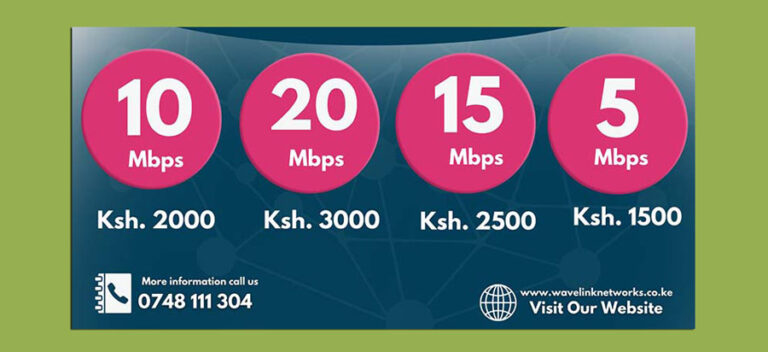
For podcasters in Nairobi and across Kenya, Wavelink Networks’ fiber‑based plans capped at 15–20 Mbps are already enough for smooth HD streaming and small‑team operations, while higher‑tier business packages support 4K‑ready workflows.
How your connection type changes everything
Not all 10 Mbps are equal. DSL often pushes upload into the 1–2 Mbps range, which is too fragile for live multi‑guest video podcasts. Cable can offer 5–25 Mbps upload, making it workable but inconsistent during peak hours.
Fiber‑optic connections, like the fiber‑based options offered by Wavelink Networks in Nairobi, typically provide symmetrical speeds, so a 50 Mbps plan gives you 50 Mbps up and 50 Mbps down. Symmetry eliminates the “upload ceiling” and lets you live‑stream, back up raw footage, and manage multiple devices without bottlenecks.
Optimizing your setup beyond raw speed
Even with solid numbers, poor Wi‑Fi, overloaded routers, or background downloads can ruin a live recording. For video podcasters, Wavelink recommends:
-
Using a wired Ethernet connection to your camera/PC instead of Wi‑Fi.
-
Prioritizing your streaming device on the router (QoS or manual prioritization).
-
Testing your actual upload speed just before going live, not relying on the plan headline.
Choosing the right plan for your podcast
Ultimately, the best internet speed for video podcasters is stable, symmetric, and slightly above your highest‑quality streaming target. For Nairobi‑based creators, Wavelink’s mid‑tier fiber plans (15–20 Mbps) comfortably cover HD streaming, small‑team interviews, and reliable file uploads, while business‑grade options scale to 4K and multi‑studio workflows. By matching your upload speed to your production ambitions, you turn your internet into an invisible backbone—so your audience only sees great content, never the tech behind it.